Showing posts with label Graphics. Show all posts

Thursday, August 19, 2010

Java Text – A Closer Look at the Ugly

Because the failings of the native Java text renderer have had such an adverse impact on my recent work, I think additional examination of the issue is merited. So, to further illustrate the difference between text rendered by Java 6 on Mac OS X and Linux, I’ve taken two paragraphs of text and written a program that fits them on-the-fly into an image of a specified size. Text fitting is vital to the operation of the application from which yesterday’s examples were taken, so it seemed appropriate to create new examples based on text fitting as well.

[By the way, this is in no sense a dig at Linux. I believe the text rendering seen on Linux is representative of Java’s built-in text rendering capabilities, whereas I believe the text rendering seen on Mac OS X is representative of OS X’s native text renderer, which I suspect Apple engineers substituted for Java’s built-in text renderer. Running the code on Linux just happens to let the ugly truth shine through. As with yesterday’s examples, the version of Java used on the Linux box was “Java(TM) SE Runtime Environment (build 1.6.0_12-b04)” and the version on Mac OS X was “Java(TM) SE Runtime Environment (build 1.6.0_20-b02-279-10M3065)”.]

The font used in all cases is Georgia, and the font binary is identical on both installations. The quotation used is from Aldo Leopold’s book A Sand County Almanac, and Sketches Here and There, which I highly recommend. (More of the quote can be found on my page of random Leopold quotes.)

The fitting errors cited below are the difference between the height, in pixels, of the area into which the text was fit, and the actual height of the text. The closer the error is to zero, the better. Considering that the errors are spread over 14 lines of text in the small font example, and 30 lines in the large font example, even the big errors aren’t significant. Nonetheless, the errors consistently show a better fit is achieved when the code is run on Mac OS X, which suggests, at a minimum, the availability of more precise font metrics, and possibly the ability of the font renderer to actually produce (subtly) different glyphs for fonts whose sizes vary by only small fractions of a point.

Small Text Rendering

This is where the difference between Java’s text rendering on Mac OS X and Linux is most obvious. Figure 1 shows a 4X magnification of approximately 12 point text when the Java test program is run on Linux. Figure 2 shows the same magnification of the text produced by the test program when run on Mac OS X. (Figure 3 shows the full renderings at normal size, in an alternating animation.)

The difference in the antialiasing algorithms is striking. In figure 2, Mac OS X shows that antialiasing is applied to every pixel of every glyph, and that the sub-pixel glyph placement this permits allows for more consistent spacing between glyphs (although one can readily find places where either renderer could do a better job of kerning). It also provides for a more consistent “color” (uniform darkness or lightness) of text. Figure 1, by comparison, shows a minimal use of antialiasing, primitive glyph shapes, some highly irregular glyph spacing, and poor color.

An examination with Adobe Photoshop shows only 127 shades of gray are used in the text from which figure 1 was taken. In contrast (no pun intended), the same examination of the text from which figure 2 was taken shows 249 shades of gray are used. So, in this case the default Java font renderer is using half of the available shades of gray to form its glyphs, while the Mac OS X renderer is using almost all of the available shades. That alone gives the Mac OS X renderer almost twice the ability to represent sub-pixel glyph features, an ability of which it seems to take full advantage. Every glyph in these two examples demonstrates this, but, if you want a specific example, take the word “July” on the sixth line. Observe that in figure 1 the bottom of the J’s curve is flat against the baseline (so much for the curve) and very nearly black, while in figure 2 its curve is carefully nuanced right down to two faint gray pixels dropping below the baseline (one is relatively obvious; the other you will probably need further magnification, or a pixel sampler, to see). The descender on the letter “y” is also worth a look. As is plainly visible in figures 4 and 5, that descender is meant to be terminated with a feature similar to a dot. However, in figure 1, there’s no trace of that dot, though it’s clearly present in figure 2.

Another difference in this rendering of small text is most obvious in the figure 3 animation: While the two renderers agree about overall line heights, they disagree on the height of the glyphs by a full pixel. Given that the lines are about 14 pixels high (leading included), that’s a 7% error, though the lack of subtlety in the rendering produced on the Linux machine results in an even greater apparent difference, at least to my eyes.

Next, there’s the matter of large text rendering.


Figure 1. Text rendered by Java 6 on Linux at 11.968737 points
(fitting error: -0.107483), magnified four times.


Figure 2. Text rendered by Java 6 on Mac OS X at 11.944245 points
(fitting error: -0.000177), magnified four times.

Small text rendering examples.

Figure 3. An animated comparison of small text rendering by Java 6 on Mac OS X and Linux. The magnified text seen in figures 1 and 2 was taken from the two renderings from which this animation was produced, seen here at their original size.

Large Text Rendering

The differences between what I’m assuming to be the native Mac OS X text renderer as used by Java 6 on Mac OS X and Java 6’s built-in text renderer, as used on Linux, are less significant at the relatively large font sizes (almost 26.5 points) used in the following figures, but they’re real enough. The figure 6 animation clearly shows many differences in letter spacing, and, while neither renderer is producing ideal results, Mac OS X looks to my eyes to be doing better overall.

Also, the magnifications shown in figures 4 and 5 suggest that, once again, the Java renderer is using fewer shades of gray when it antialiases text than the Mac OS X renderer. And that is, in fact, the case. An examination with Photoshop shows only 123 shades are used in the Java-on-Linux rendering, while the Java-on-Mac-OS-X rendering uses all 256 shades (both numbers include black and white).

Once again, that—and perhaps other failings of the renderer—leads to a lack of subtle detail in the text. Observe that in figure 5 almost every curve or vertical serif that touches the baseline actually extends around half a pixel below it. That doesn’t happen in figure 4. Yet, extending a curve slightly below the baseline is a basic trick of typography – as a curve reaches its bottom it becomes less and less visually significant. If it bottoms-out precisely on the baseline, then it touches the baseline, in principle, at an infinitely small point, and—though an infinitely small point can’t be rendered—the curve nonetheless has reduced contact with the baseline relative to surrounding features that have large areas in contact with the baseline (horizontal serifs, for instance). And that difference in the degree of baseline contact tends to make the glyph with a curved bottom appear to float slightly above the baseline. So, typographers design their fonts to correct for this perceptual error, by dropping the bottom of curves slightly below the baseline. Typographers have a lot of little tricks like that – more, I’m sure, than I’m aware of. And that’s why antialiasing is so important to accurately preserving the look of text on computer displays, at least until our displays exceed something on the order of 300 dots-per-inch of resolution.

The folks behind the text renderer used by Java on Mac OS X clearly demonstrate an understanding of these issues and their importance. There are, nonetheless, strange imperfections in their results, but those seem to stand-out because so much else is done well. The folks responsible for the text renderer used by Java on Linux, which I assume to be Java’s native text renderer, don’t seem to care about these issues. Or, if this article is correct (and I have no reason to doubt it), the Java text engineers get it, but their management doesn’t. (Or it hasn’t – we’ll see if the new Oracle management is any better than the old Sun management, though I see no reason for optimism.) Thus, not only the subtle aspects of the art of typography—those that bend type around the particulars of human perception—but the grossest qualities of glyph formation and spacing are … well, I struggle for the right word. “Trashed,” isn’t quite it, but it’s in the correct neighborhood. And that neighborhood should also include either a pervasive failure of perception, or a cretinous disregard for the quality of what one perceives. Maybe both.


Figure 4. Text rendered by Java 6 on Linux at 26.406231 points
(fitting error: -0.957642), magnified four times.


Figure 5. Text rendered by Java 6 on Mac OS X at 26.403095 points
(fitting error: 0.000000), magnified four times.
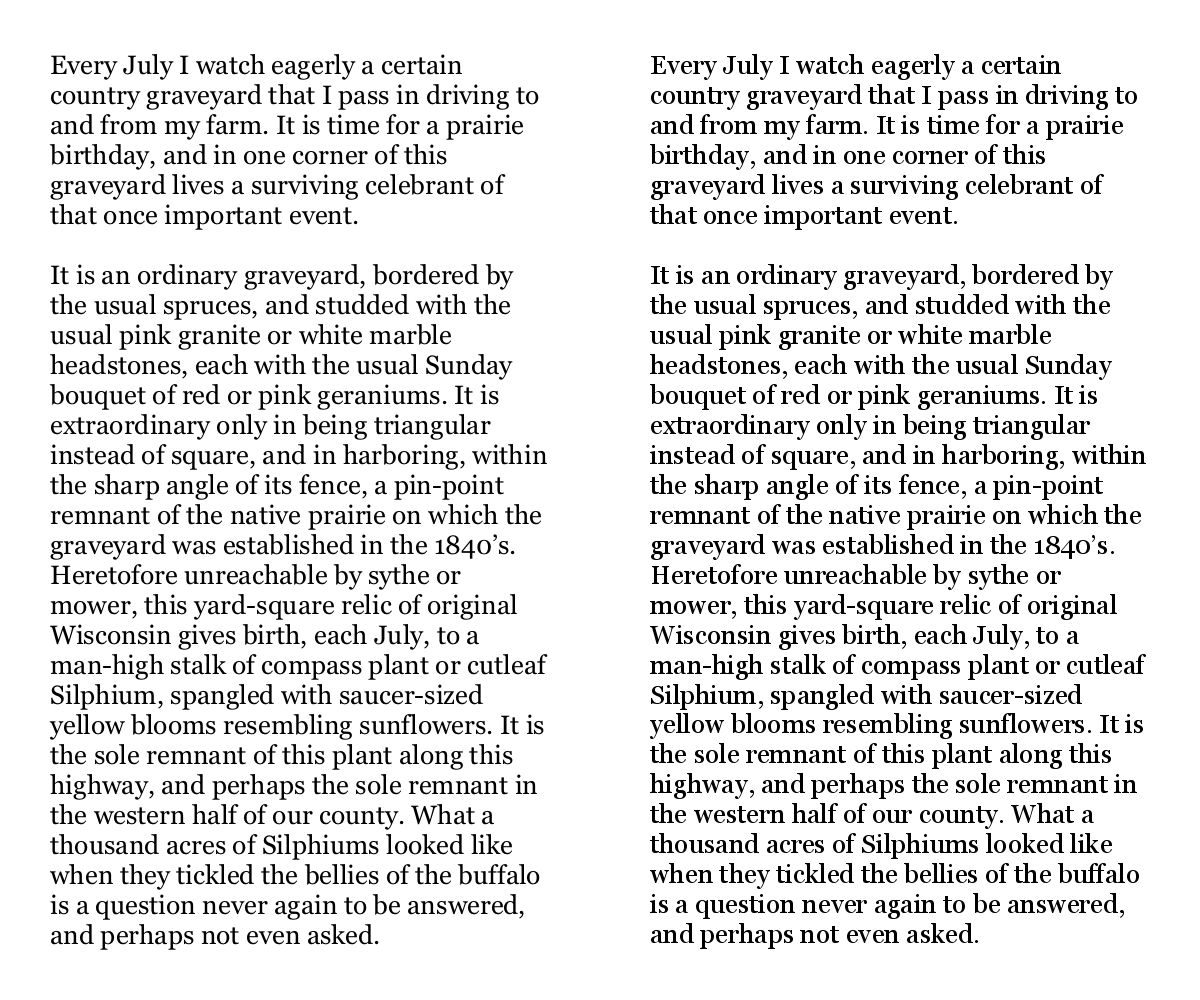
Large text rendering examples.

Figure 6. An animated comparison of large text rendering by Java 6 on Mac OS X and Linux. The magnified text seen in figures 4 and 5 was taken from the two renderings from which this animation was produced, seen here at their original size.

The Original Renderings

If you’d like to see the original renderings from which the magnifications and animations were generated, here they are.

Wednesday, August 18, 2010

Java Text - When Platform Independence Fails

I‘ve recently been working on a Java web application that does server-side rendering of complex graphics that include text. Having sweated all the details to maximize the quality of the application’s output; having finally made the application sufficiently stable and feature-complete to enter beta testing; and having jumped through some unrelated hoops to make the production host usable, I finally found myself at the point where I could deploy the application to its production server.

I thought I was on the brink of success at long last, but when I tried the web application on its production Linux VM, the results were terrible. The text was rendered very differently between Java 1.6 on Mac OS X, which is my development environment, and Java 1.6 on Linux, which is the deployment environment. Specifically, the resolution-independent, anti-aliased, fractional-sized text was rendered beautifully by Java on Mac OS X, and horribly by Java on Linux. You can see for yourself in the examples below. (Due to confidentiality rules, I can’t show the entire rendering, which is unfortunate in this case, because the differences are even more striking when seen en masse.)


Text rendered by Java on Mac OS X, using
“Java(TM) SE Runtime Environment (build 1.6.0_20-b02-279-10M3065)”.


Text rendered by Java on Linux, using
“Java(TM) SE Runtime Environment (build 1.6.0_12-b04)”.


Above, the two samples converted to an animated GIF and perpetually alternating.

Note that in both cases, exactly the same typefaces are being used: Arial (bold and plain) in the yellow area, and Georgia (plain) for the names above. Also in both cases, the rendering was performed in a Graphics2D environment with all of its hints set to maximum quality, and the backing BufferedImage was of the same type (TYPE_INT_RGB). Both systems are even using exactly the same TrueType fonts; I copied them from my Mac to the JRE on the Linux box. Nonetheless, Java’s font rendering under Linux looks like some early, unfinished attempt at supporting TrueType, anti-aliasing and fractional font sizes/metrics. Java on Mac OS X, on the other hand, handles all of the text beautifully.

My best guess is that the results on Linux are representative of the true capabilities of Java's built-in text renderer, while the very different results on Mac OS X are probably due to Apple’s Java engineers substituting OS X’s native font renderer for Java’s. Others seem to have reached similar conclusions in the past.

So, because of these platform dependent text rendering behaviors, I’ve gone from believing that I was ready to deploy an application whose quality was going to reflect well on myself and my organization, while delighting its users, to being so ashamed of the graphics quality that I don’t want to proceed with the deployment; I don’t want to be associated with such poor quality, and I don’t want it being seen as representative of the care that my organization puts into its work.

Arguably, the platform independence was undone by Apple (if the scenario above is correct), but Java’s native text rendering is so bad, I can’t blame them. In fact, I’m glad there’s at least one platform that can run Java and render text well. The real fault seems to be with Sun’s (now Oracle’s) management for not giving Java’s text engine the attention it deserves.

Of course, if anyone knows that I’m wrong about those conclusions, and can show me how to get the same quality of text rendering out of Java on Linux as I get from Java on Mac OS X, I’d be very grateful. And so, I think, would others.

Help if you can, please. Beware of this issue, if you can’t.

Sunday, November 23, 2008

Mandelbrot Fractals

I recently returned to my explorations of the Mandelbrot fractals, using my custom, multi-processor implementation of the classic algorithm. One rude surprise: Java's Bicubic interpolation, which my code had counted-on for antialiasing the images, has spontaneously ceased to work somewhere in the couple of years since I last went diving in Dr. Mandelbrot's seas. One custom down-sampler later, and I'm back in business, but still wondering what happened to the Bicubic interpolation support. (Some Google searches confirm the issue, but don't explain why it ever worked, or how to get it working again.)

Anyway, some of these images are new, while some are higher-resolution renderings of images I'd previously produced. All use 16:1 antialiasing for clarity. Unfortunately, Blogger has scaled-down the images in accordance with its internal size limits. To see these, and other Mandelbrot images, at full resolution, visit my Mandelbrot fractals page.

(0.251264159878095-0.000071302056312561i,+0.2512651036183039-0.000071898102760315i) (0.2512619694073995-0.000070631504058838i,+0.25126574436823523-0.000073015689849854i) (0.2512600819269816-0.00006943941116333i,+0.25126763184865314-0.000074207782745361i) (-1.9415377561052738+0.000004419728327122i,-1.9415377426291933+0.00000441121711836i)

The image above had to be computed to a depth of 2.5 million iterations. At lesser depths, the structure appears to be a part of the Mandelbrot set. How many other apparent parts of the set would turn-out not to be, if they were examined deeply enough?

(-1.9405475727980244+0.000000000020618141i,-1.9405475727568255-0.000000000020580682i) (-1.9405475727807724+0.000000000003366096i,-1.9405475727740777-0.000000000003328637i) (-1.9405470533408833+0.000000000011699758i,-1.9405470533399718+0.000000000010788309i) (-1.9405469455956967+0.000000000712956i,-1.9405469445200192-0.00000000072128073i) (-1.9405469451864226+0.000000000549857802i,-1.9405469449474801+0.000000000398946793i) (-1.940547686187619+0.000000000256137123i,-1.9405476861868012+0.000000000255319443i) (-1.940546945070056+0.000000000267948696i,-1.940546945067154+0.000000000265046485i) (-0.7499062220255533+0.01945350170135498i,-0.7498911221822102+0.019443964958190917i)

Friday, September 12, 2008

iPhone 2.1 Software Brings SVG Support

Kudos to Apple - in the iPhone 2.1 software, released today, the Safari web browser has acquired support for the World Wide Web Consortium's Scalable Vector Graphics (SVG) specification, a feature that I'd sorely missed until now. What a very pleasant surprise.

Anyone unfamiliar with SVG can see some examples of what it, mixed with Javascript, can do on my Automatons page. Note that because SVG is resolution independent, it makes full use of the 163 pixel-per-inch iPhone display, so it not only looks clean and sharp at its default size, but you can just keep zooming in to see more detail.

It must be said that the iPhone's new SVG support won't set any speed records (unlike the desktop version of Safari), but the iPhone's resources are limited, so that's to be expected. It's just great to see this technology supported in yet another browser/platform.

Friday, August 22, 2008

You are getting sleepy, very sleeeepy....

More tinkering with Scalable Vector Graphics (SVG) and Javascript, just for fun. (Unfortunately, if there's anything actually fun about Javascript itself, I still haven't found it.) Anyway, click on the rotating spiral to stop it. Click again to start it in the opposite direction. Another click stops it again. And yet another click starts it rotating in the original direction. And so on.

If your browser supports the Scalable Vector Graphics standard, and Javascript, you should see a rotating spiral. If not, allow me to suggest a change of browsers.

This program works well in Firefox 3 and Safari 3.1.2. It works very well in Safari 4, by which I mean the current WebKit nightlies. (If you're frustrated that the version of Safari in the iPhone has no SVG support, join the club.) In Opera 9.5.2 the program runs slowly (roughly ¼ the speed of Safari 3.1.2) and with stuttering motion. Firefox 2 is much worse; it works, but too slowly to be worthwhile. However, if your browser is running this program well, you can open it in a separate window and scale it to arbitrarily large sizes. (Or not.)

Any easily suggestible people who find themselves hypnotized, are hereby ordered to think for themselves, and to demand rigorous logic from any idea, internal or external. Everyone else may quack like a duck ... you know, if that seems like a good idea.


Come to think of it, They Might Be Giants had more than a few words to say about a spiraling shape, including the following:

And now that you've tried it,
you're back to report
that the spiraling shape
was a fraud and a fake,
You didn't enjoy it,
you never believed it,
there won't be a refund,
you never go back.

Sunday, June 8, 2008

Rule 30 Automaton Cylindrical Projection

This program generates and renders the output of Stephen Wolfram's "rule 30" cellular automaton. Like my previous implementation, the line of cells in which it is calculated wraps around at its ends, meaning that the line is really a circle. Unlike the previous implementation, which rendered its output in the standard two-dimensional matrix, this version takes seriously the fact that the line of cells is really a circle, and therefore plots the output on the interior of a cylinder, so the "wrap-around" behavior is visually explicit, and the output is, in effect, three-dimensional.

This is not necessarily a better visualization of the automaton's output, but it is different, interesting, and up-front about the wrap-around behavior. Make of it what you will.

Unfortunately, like my previous implementation, this one will also bring current web browsers (Firefox 2.0.0.14 and 3.0, and Safari 3.1.1) to their computational knees. Once again, the computations being performed are trivial, but something about the graphics it produces overwhelms current browsers. The only browser I've tested that can handle this program even somewhat reasonably is WebKit, the open-source heart of Apple's Safari browser. (Download the latest nightly build.)

If your browser supports the Scalable Vector Graphics (SVG) standard, you'll see cylindrical projection of a Rule 30 one-dimensional cellular automaton here. Otherwise, it's time to switch to a modern browser like Safari or Firefox.

To start this program, click in the square above. To stop it—assuming your web browser will let you stop it—click in the square again. Because the program generates resolution independent graphics, it more-or-less goes without saying that opening it in a large window produces nice results.

Friday, June 6, 2008

SVG "Rule 30" Denial-of-Service

With my brain jammed in neutral the other day, I decided to implement a little program that I thought would be interesting, quick, and capable of knocking me into a productive mental gear. I got more than I bargained for.

What I implemented was Stephen Wolfram's "rule 30" one-dimensional cellular automaton, using SVG for the graphics, and Javascript for the logic. Between the innate simplicity of the automaton, and the fact that this implementation is only 192 cells wide, this program is computationally insignificant. Nonetheless, if you make the mistake of clicking in the display area below to start it running, it will bring Safari 3.1.1, Firefox 2.0.0.14 and Firefox 3.0 to their knees. Their CPU utilization hits 100%, and they are rendered almost, or completely, unresponsive either immediately, or once the first 192 rows have been generated and scrolling is supposed to commence. In principle, clicking on the display area again should stop this program, but Firefox 2.0.0.14 is so stuck it seems to respond to nothing but a forced quit. Firefox 3.0 will eventually respond, but it can take minutes. Safari 3.1.1 is more responsive than that, but still very bad.

If your browser supports the Scalable Vector Graphics (SVG) standard, you'll see the Rule 30 one-dimensional cellular automaton here. Otherwise, it's time to upgrade to a modern browser like Safari or Firefox.

This program does not try to consume all available CPU cycles. As mentioned earlier, it is computationally insignificant. It is also rate-limited to 24 updates per second. So, the varying speeds of the Javascript interpreters shouldn't make much, if any, difference to performance. However, I have yet to find a browser that can manage more than about three updates per second once the display fills and scrolling commences. This seems to be either a problem with their DOM implementations in general (a full display of 192 rows will typically be composed of about 9,200 rectangles, each one a DOM object), or their SVG implementations (which build on the DOM implementation), or both. In the context of modern computing power, it's hard to take seriously the idea that handling 9,200 essentially static graphics objects (and simple rectangles, at that) should be a problem, but for one reason or another, that is the case.

The only browser I've tested that handles this program at all gracefully is WebKit, in its most recent nightly builds. (WebKit is the open-source browser engine on which Apple's Safari browser is built.) Although the WebKit team announced earlier this week that they've replaced their Javascipt engine with a new one named "SquirrelFish" that is substantially faster than its predecessor, due to the computational simplicity of this program, I doubt that SquirrelFish is the reason for WebKit's better performance relative to the other browsers. I continue to think that DOM and/or SVG implementations are the key to this program's performance, or lack thereof.

Congratulations (seriously) to the WebKit team for having created by far the best browser I've tested, but, as far as this little program is concerned, there's still a lot of room for improvement.

Tuesday, May 20, 2008

Clock version 3 with Lunar Illumination

Version 3 of the clock (revised to 3.0.11 on 2-Nov-2008) brings lunar illumination indicators to the days of the month, and therefore includes a substantial amount code for astronomical calculations, all based on algorithms created by Jean Meeus, and described in his book Astronomical Algorithms, second edition, 1998. Therefore, credit for all of the astronomical data and algorithms goes to the good Mr. Meeus, while credit for this peculiar Javascript implementation, and any of its (as yet undetected) bugs, is mine – all mine.

One subtle new feature is the ability to rotate the clock. As of revision 3.0.8, drag anywhere, and the clock rotates accordingly, while continuing to update the time as usual. Click anywhere to restore the clock to its normal, upright position. If this feature has any actual utility, it is the ability to view the lunar illumination indicators in their correct orientations.

Unfortunately, even rotated to the proper vertical orientation, the lunar disks will not necessarily represent the orientation you'd see if you went outside and looked at the moon. The problem is the inability to calculate the parallactic angle, which depends on one unavailable piece of information: the viewer's latitude. Otherwise, the disk illuminations shown are quite accurate, based, as they are, on gratuitously precise calculation of the positions of the Sun, Earth and Moon. Basically, every time Meuus said "if no high accuracy is required, do it this way" I did it the other way. I think a clock should have precise and beautiful innards. And because this one is virtual, all of the gratuitous levers, springs and gears add nothing to the cost, and therefore neither economics, nor common sense, need be allowed to spoil the clock maker's fun.

On the off chance that anyone else has a use for all of those extra mechanics, I'm releasing the clock under the GNU General Public license, version 3 or later. (I've also written a much cleaner Java implementation, complete with unit tests, if anyone has a use for that.)

As always, the clock is best appreciated by opening it in a separate window, and making that window as large as possible.

Please enjoy.

Ideally, you'll see an active clock here, provided that your browser supports Javascript and the Scalable Vector Graphics (SVG) standard.

Lessons Learned

  • Fixed in clock version 3.0.11: The hour-of-day indicator now adjusts to the change from daylight savings time to normal time.
  • Firefox 3.0.1 renders neither the text on the clock face, nor the time indicators. There were no such problems in the earlier versions of Firefox 3, though I don't know at which build the problem was introduced.
  • Fixed in clock version 3.0.8: When using the Javascript methods for setting the fields of a Date object (year, month, day, hour, etc.), it is important to use those methods in order from least significant (milliseconds) to most significant (full year). Otherwise, the date may be corrupted.
  • No version of Firefox or Safari respects the zoomAndPan attribute of the svg element. According to section 16.7 of the SVG 1.1 specification, when the zoomAndPan attribute is set to magnify, “the user agent shall provide controls to allow the user to perform a "magnify" operation on the document fragment.” Sadly, that doesn't happen at present.
  • Safari 3.1.1 refused to execute the script in the clock when I initially embedded it in this post. After some experimentation, the problem was resolved by including the UTF-8 Byte-Order-Mark (BOM) at the start of the clock's source file. Firefox 2.0.0.14 had no problem with the absence of the BOM, and Safari shouldn't have had a problem, either, as the XML specification is very clear about how to identify the character set of an XML file with, or without, a BOM. If I can implement that algorithm (and I have, in Qwicap), gosh darn it, so can Apple. (But perhaps Safari does implement it, and the addition of the BOM merely correlated with, rather than caused, the resolution to this problem. Right now, I don't care enough to perform all of the tests required to find out.)
  • Neither Firefox 3.0b5, nor 2.0.0.14, can cope with a negative X radius for the ellipse that defines an arc drawn by the "arc" command of the path element. Safari 3.1.1 handles this without any problem. Fortunately, it is possible to workaround the Firefox bug(s) by using the absolute value of the X radius in the arc definition, and then changing the arc's "large arc" flag to zero when the radius goes negative.
  • Firefox 2.0.0.14 runs this clock very slowly. One might suspect that all of the additional astronomical computation associated with the lunar illumination indicators is responsible, but, in fact, that code runs only once when the clock begins running and then once more each time the month changes. My best guess is that the Firefox 2 SVG engine is of generally low performance (I believe that's widely acknowledged), and that it probably redraws more of the image than is strictly necessary whenever the image changes (for example, when the second hand moves). Those two factors combine with the increased graphic complexity of the new version of the clock to consume a startling amount of CPU time, sometimes so much that it takes much more than a second to redraw the clock after each "tick" of the second hand. While that looks awful, the clock still keeps perfectly good time; it just can't display it smoothly.
  • Firefox 3.0b5 has a dramatically faster SVG engine than its predecessor, and therefore has no trouble keeping the second hand moving steadily, while using very little CPU.
  • The SVG engine in Firefox 3.0b5 has bugs that the engine in 2.0.0.14 does not. The failure to draw the names of the months in the clock is one such bug. (Strangely, the names put in a partial appearance when the clock is rotated.)
  • For the moment, the hands-down winner for SVG performance and correctness is Apple's Safari, version 3.1.1. Resize the clock to fill your screen and it'll not only draw correctly, but it will barely touch your CPU while doing so. Hopefully, the problems in Firefox 3's SVG engine will be resolved soon, and we'll have two cross-platform browsers with high-performance SVG engines in them. (Perhaps there already are two, or more, such browsers - I haven't investigated Opera, for instance.)
  • It's very difficult to think in Java, and implement in Javascript. Or, more specifically, to write the code in Java first, in order to get it clean and unit tested, and then to translate it into Javascript. I still have not grasped the "zen" of Javascript, and am just stumped when it comes to good ways to translate things like static methods and constants into something equally clean and usable in Javascript. So far, I just don't like the Javascript language one bit. Only its unique position as the embedded language of web browsers gives it any value to me. Nonetheless, until I do a decent job of thinking in Javascript, these judgements are premature.
  • Cross-compiling Java into Javascript, as the Google Web Toolkit does, sounds great, but GWT's current class library is too minimal for this clock's needs. If they port the Calendar and GregorianCalendar classes (a need they seem to acknowledge in their forums), I'll have to give it another try.
  • Getting the capabilities of the Java language into browsers without the current overhead of firing-up a Java Virtual Machine (JVM), makes the implementation of a JVM in Javascript intriguing.